
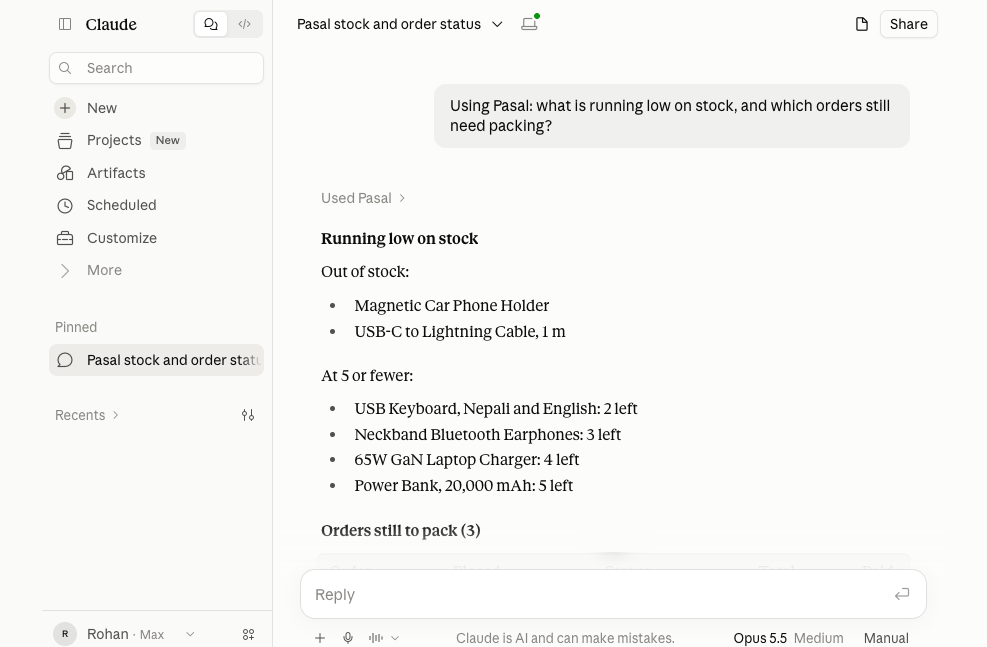
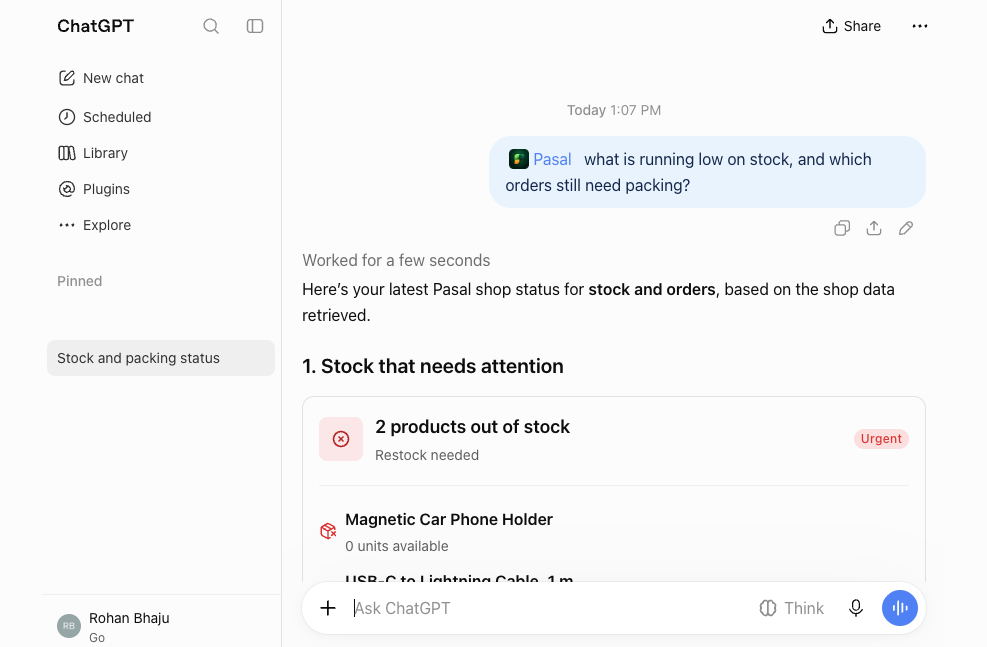
A shop owner who wants to know what is running low usually opens the dashboard, finds the stock page and reads down the list. In Pasal there is now another way: ask ChatGPT or Claude in your own words, and get the answer from your own shop's books. What makes that possible is a plain-sounding standard called MCP. This post explains what it is, why it changes how software gets built, and where its limits are.
What MCP is
MCP stands for Model Context Protocol. Anthropic, the company that makes Claude, published it in November 2024 as an open standard: a shared set of rules for how an assistant such as Claude or ChatGPT asks another program for information, or asks it to do something. The official MCP site compares it to a USB-C port. One shape of plug, so a phone does not need a different cable for every charger.
It did not stay one company's project. ChatGPT lets people add MCP servers, and in December 2025 Anthropic handed MCP to the Agentic AI Foundation, a fund under the Linux Foundation that Anthropic, Block and OpenAI started together. That announcement names ChatGPT, Gemini, Microsoft Copilot, Cursor and Visual Studio Code among the products that use it.
In shop terms: before MCP, software that wanted to work with an assistant had to build a separate link for each one, in each company's own way. With MCP, the software describes its tools once, for example "get the sales for a period" or "list what is low on stock", and any assistant that speaks MCP can use them.
Why it matters to the people who make software
One connector, several assistants. Pasal runs one address, https://pasal.studio/mcp, and the same address works in ChatGPT and in Claude. There is no separate ChatGPT version and Claude version to keep in step.
Sign-in and permission are part of the standard. MCP's rules for sign-in are built on OAuth 2.1, the same kind of sign-in you see when a website offers "Continue with Google". The assistant never gets your password. It sends you to the software's own page, you sign in there and say yes, and the software gives the assistant a key that works only for what you allowed.
The software decides what the assistant can do. An assistant connected over MCP can only use the tools the software offers, and the software checks every call. If shop software offers no tool that edits prices, nothing typed in a chat can make the assistant edit prices.
Why it matters to the people who use it
You ask in your own words. "How did this week go against last week?" is quicker than finding the right report and the right dates. You can follow up with "and which items made the difference?" without starting again.
The numbers come from your own books. Without a connector, an assistant asked about your shop can only guess, or work from what you paste in. Connected, it reads the same figures your dashboard shows, at the moment you ask.
You choose what to allow, and you can take it back. The yes happens on the software's own page, not in the chat, and a careful connector lets you see every connection and end it.
There are honest limits too:
- An assistant can still word things wrongly. It reads correct figures, but it writes the sentences around them, and it can misread a date range or add numbers up on its own. If an answer matters, check it on your dashboard.
- What it reads goes to the assistant's company. Figures read into ChatGPT go to OpenAI, and into Claude go to Anthropic, under their own terms. Read those terms, and allow only what you are comfortable sharing.
- A connector is only as careful as the software behind it. OpenAI's own page says custom MCP servers are not developed or verified by OpenAI. Connect only software you already trust with your shop.
- Reading is the safe start. A connector that can only read cannot lose you money through a misunderstanding. One that can change things should ask you first.
How Pasal does it
- Off until the owner switches it on. It is part of Pasal Pro, and a trial counts. It stays off for every shop until the owner turns it on in Settings → AI assistants. Staff cannot turn it on.
- Six things it can read. Sales for a period against the period before, best sellers, low and out-of-stock items, open orders, bookings, and khata totals. It cannot change orders, stock, prices or money.
- Customer names only if you tick them. On the yes page, names and phone numbers start unticked. Left off, they stay hidden. PAN and VAT numbers are never shown either way.
- Each person sees their own share. The owner and staff each connect their own assistant with their own Pasal sign-in. A cashier without Analytics gets no sales figures in the chat, just as in the dashboard.
- Shop looks have their own tick. The assistant can make a preview link of a new look without changing your shop. Keeping drafts and publishing one needs a separate tick, which starts off. When ChatGPT is about to publish a look, it asks you first.
- You can see it and end it. Settings → AI assistants lists every connection, who allowed it, when, and when it was last used, with Revoke and Revoke all. It also lists recent questions by kind, such as sales or stock. Pasal keeps the kind, not your words or the answer. A connection left unused for three months ends by itself.
Where to find it
In Claude, Pasal is in the connectors directory: open Customize, then Connectors, and search for Pasal. Claude marks it as a community connector, not verified by Anthropic, as it does for any new listing. In ChatGPT, Pasal is waiting for OpenAI's review before it joins the plugin directory. Until then, add it by its address under Plugins → Add → Add custom MCP server. Settings → AI assistants has a Connect button for each.
Every step, with pictures, is in Connect Pasal to ChatGPT or Claude. What the assistant can and cannot see is in Ask Pasal from ChatGPT or Claude.
Try these questions
- "How did sales go today compared with last Saturday?"
- "What were my best sellers this month?" Months follow Bikram Sambat unless you ask for AD.
- "What is running low on stock?"
- "Which orders are still to pack?"
- "How much is owed on khata, and on how many accounts?"
- "What bookings do I have today?"
In ChatGPT, start the question with @Pasal. If an answer looks wrong, compare it with Analytics or the order board, and tell us.
MCP does not make an assistant know your shop better by itself. It gives the assistant a door into your own books that you open, with a key you can take back. For a shop owner, that is the useful part.