
Help · Account & troubleshooting
What happens when your free trial ends
Pasal locks until you upgrade to Pro. Nothing you have made is deleted.
Every new shop opens on Pro, free, for 90 days. Nothing is charged and no card is taken, so nothing needs cancelling: the day after that, Pasal asks you to upgrade before you can use the shop again.
The short version: please upgrade to Pro to keep using Pasal. The dashboard locks. The counter, the books, staff and the rest of the desk wait until you subscribe. Nothing you have made is deleted.
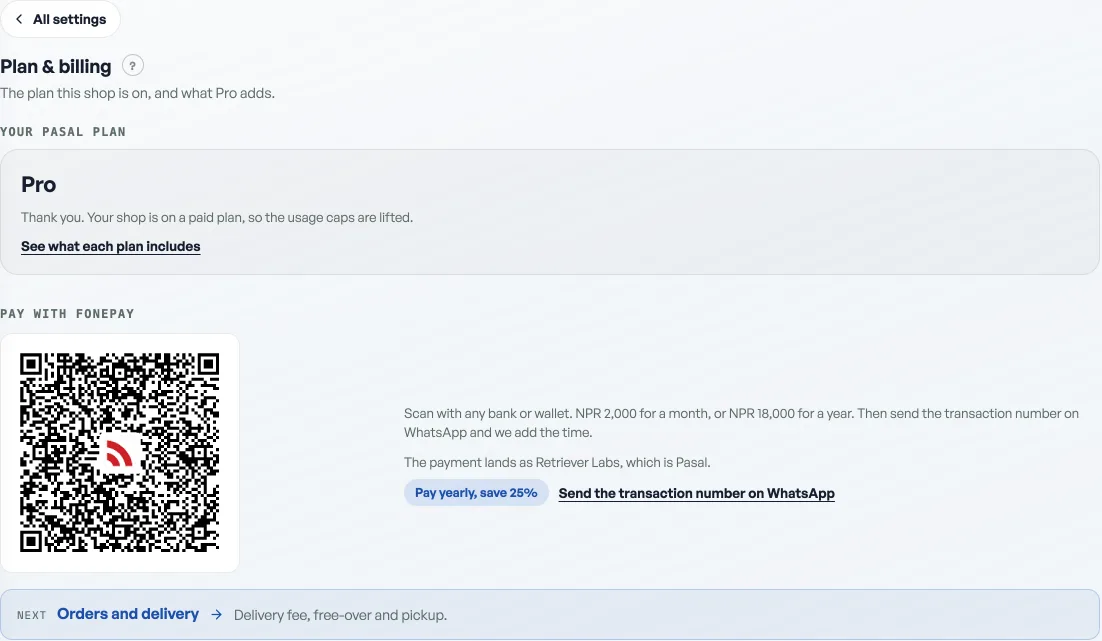
What you see
The next time you open the dashboard it is one screen. It names your shop and says to upgrade to Pro to keep using Pasal. If you are the owner, the Fonepay QR is on that same screen. Staff see the same lock and are asked to tell you.
Nothing is deleted
Not one row. Your products, khata balances, ledgers, events, guest lists, point balances, promo codes and counter sales all sit exactly where you left them. Turn Pro back on, whether that is next week or next Dashain, and every tab comes back with its contents untouched.
What to do about it
Scan the Fonepay QR on the lock screen, or see What Pro costs and how to turn it on. Send the transaction number on WhatsApp and we switch Pro on. If you cannot get into the dashboard at all, that is this lock, not a broken login: see You cannot get into your dashboard only if the sign-in page itself is what is failing.
- What Pro costs and how to turn it onThe price of Pro by the month and the year, what it adds, and how to pay for it today.
- When a tab or a button is missingWhy two people can open the same dashboard and see different tabs, and how to get one back.
- Getting started with PasalFrom an empty page to a live shop taking orders, and what your free trial includes.